
What to Know About Swollen Phone Batteries
What to Know About Swollen Phone Batteries
A customer walks into your wireless store and places a phone on the counter.
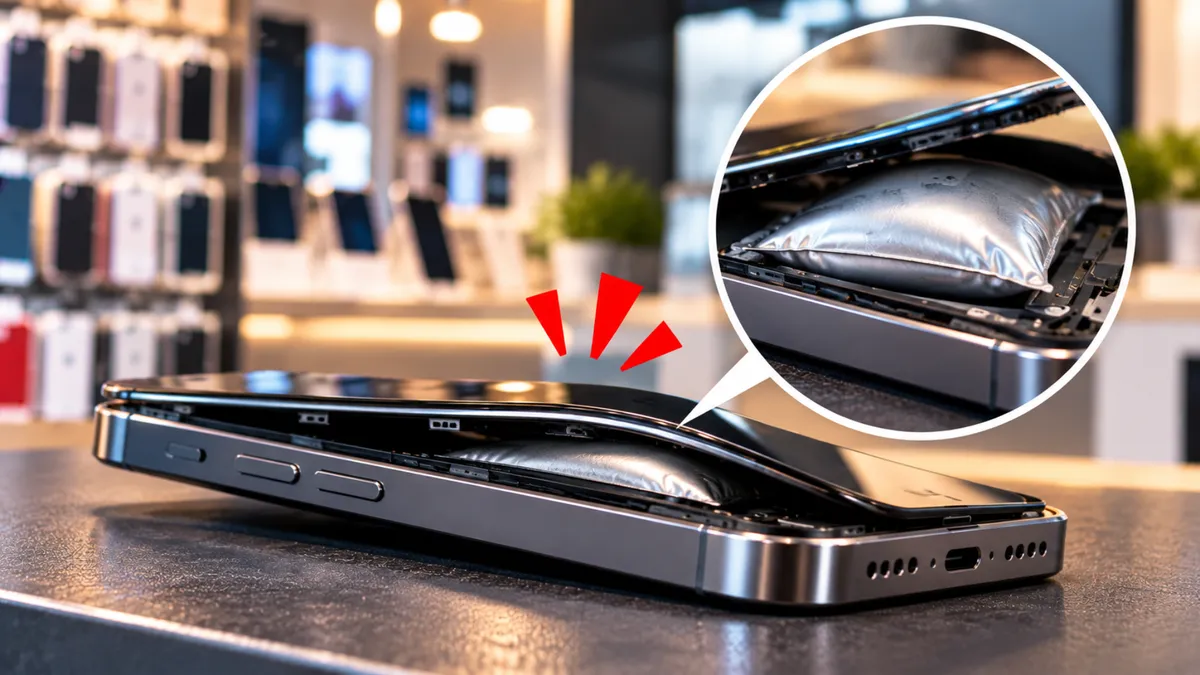
The screen is separating from the frame, and the back of the phone looks slightly raised.
The customer asks, “Can you fix this?”
Your employee might think it is a damaged screen or a loose back cover. But there is another possibility worth taking seriously.
The battery inside the phone could be swelling.
For wireless dealers, recognizing this warning sign matters even if your store does not offer repairs.
A swollen battery can become a safety problem, and knowing how to respond can help protect your employees, your customers, and your business.
Why Phone Batteries Sometimes Swell
Most modern smartphones use rechargeable lithium-ion batteries.
These batteries store the energy that allows phones to operate throughout the day.
Over time, batteries can deteriorate. Damage, excessive heat, manufacturing defects, or other internal problems can also affect their condition.
In some cases, chemical reactions inside a damaged battery produce gas.
Because the battery is enclosed, pressure can build up and cause it to expand.
This expansion may push against the phone's screen or back cover.
A swollen battery should not be treated as normal wear.
It is a warning sign that the battery may be damaged and could present a fire hazard.
Warning Signs Your Employees Should Recognize
Battery swelling is not always obvious at first.
Sometimes the customer notices that the phone looks different but does not understand why.
Here are several warning signs your team should recognize.
1. The screen is separating from the frame.
A screen that starts lifting may indicate pressure from inside the device.
2. The back cover looks raised or uneven.
A bulging back panel can be a sign of internal expansion.
3. The phone no longer sits flat.
If the phone appears distorted or unstable on a flat surface, internal damage may be present. Do not press on it or perform physical tests to confirm swelling.
4. The device becomes unusually hot.
Excessive heat can indicate a battery problem, especially when combined with other warning signs.
5. The phone makes unusual noises or produces an unfamiliar smell.
Hissing, popping, leaking, smoke, or unusual odors may indicate a more serious battery emergency.
Not every phone with poor battery life has a swollen battery.
And not every lifting screen is caused by battery swelling.
The important thing is recognizing when a device needs professional attention rather than continuing normal troubleshooting.
A Lifting Screen Is Not Always a Simple Screen Repair
Imagine a customer visits your store because their phone screen is lifting at one corner.
They assume the screen needs new adhesive.
An employee might be tempted to push the screen back into place or suggest a quick repair.
But if the battery underneath is swollen, applying pressure could damage it further.
Instead, the employee should recognize the possibility of a battery problem and stop routine handling.
The customer should be advised not to continue using or charging the device.
A qualified repair professional or the manufacturer can help determine the appropriate next step.
This is why employees should understand the difference between a routine device problem and a possible safety concern.
What to Do When You Suspect Battery Swelling
Your team should have a clear procedure for situations involving potentially damaged batteries.
Stop normal device use and charging.
Advise the customer not to continue charging or using the phone.
If the device is connected to a charger and it is safe to disconnect, stop charging it without manipulating the damaged area.
Do not press, bend, or open the phone.
Never try to flatten the battery, push a lifted screen back into place, or puncture the device.
Avoid unnecessary handling.
Do not continue testing the device or attempting repairs at the sales counter.
Keep people away from a potentially dangerous device.
If there are no signs of an active emergency, follow your store's approved damaged-battery procedure and seek guidance from a qualified professional.
Do not improvise storage or containment methods.
Escalate serious warning signs immediately.
If the device begins smoking, hissing, venting, or becoming dangerously hot, stop handling it, move people to safety, and contact emergency services when appropriate.
Employees should not attempt to manage an active battery fire without appropriate training.
The goal is to recognize the problem and respond safely, not to become a battery technician.
Never Treat a Swollen Battery Like a Normal Repair
Some wireless stores also provide phone repair services.
Others focus on activations, devices, and accessories.
Regardless of your business model, swollen batteries require special care.
Modern phones can be difficult to open because of adhesives, internal components, and compact designs.
A damaged lithium-ion battery can be especially hazardous if it is bent, punctured, overheated, or handled incorrectly.
If your store does not have qualified technicians, suitable equipment, and approved procedures, do not attempt the repair.
Refer the customer to the manufacturer or a qualified repair provider.
If your store does offer battery replacement, make sure employees understand which tasks require specialized training.
Recognizing the problem is a useful retail skill.
Repairing a damaged battery is a different responsibility.
How to Explain Battery Swelling Without Confusing Customers
Customers may become worried when they hear that their phone has a possible battery problem.
Your team should explain the situation calmly without making promises or minimizing the risk.
For example, an employee could say:
“Your phone looks like it may have a swollen battery. That can happen when a battery becomes damaged or deteriorates. Because it could be a safety issue, I recommend that you stop using and charging it and have it checked by a qualified technician.”
This explanation is simple and responsible.
It tells the customer what might be happening and what they should do next.
Avoid telling customers that the phone is definitely safe to continue using.
Also avoid guaranteeing that a battery replacement will solve every problem.
The condition of the device should be assessed by someone qualified to inspect it.
Help Customers Understand Repair and Replacement Options
Once the immediate safety concern has been addressed, customers may want to know whether repairing or replacing the phone makes more sense.
The answer depends on the device's age, condition, repairability, and professional assessment.
A relatively new phone may be worth repairing if a qualified technician determines that it can be serviced safely.
An older phone with several existing problems may be a better candidate for replacement.
Wireless dealers can help customers compare suitable replacement devices without attempting unsafe repairs.
For example, a customer may want to know:
What replacement phones fit their budget?
Can they keep their current phone number?
Which devices are compatible with their service?
What activation requirements apply?
How can they recover their information through an appropriate backup or transfer process?
Do not attempt to power on or charge a damaged device just to transfer data.
If the customer needs information from the phone, refer them to a qualified professional to discuss safe recovery options.
The goal is to help the customer move forward without creating additional risk.
Damaged Batteries Need Proper Disposal
A swollen lithium-ion battery should not be thrown into an ordinary trash bin.
It also should not be placed in regular household recycling.
Damaged batteries can create fire hazards during collection, transportation, and waste processing.
Customers should contact the manufacturer, an appropriate battery recycler, or their local hazardous waste authority for disposal instructions.
Not every recycling location accepts swollen or damaged batteries.
If your store collects used batteries, make sure you understand the applicable storage, handling, and transportation requirements before accepting them.
Do not assume that an ordinary battery collection box is suitable for damaged batteries.
Proper disposal is another important part of protecting employees, customers, and the community.
Customer Safety Can Build Long-Term Trust
Not every customer visit needs to become an immediate sale.
Sometimes the most valuable thing your team can do is recognize a problem and guide the customer toward the right help.
Imagine a customer comes in expecting a quick screen repair.
Your employee notices signs of possible battery swelling and explains why the device should not be handled like an ordinary repair.
Even if your store cannot fix the phone, the customer receives useful information.
That experience can influence how they remember your business.
When customers see that your employees prioritize safety and explain things clearly, they have more reason to trust your recommendations.
That trust can support future visits for phones, accessories, activations, and other wireless needs.
Train Your Team to Recognize Battery Warning Signs
Wireless dealers can start improving battery safety awareness with a few practical actions.
1. Teach employees the visible warning signs.
Make sure they recognize bulging cases, lifting screens, unusual heat, and other signs of possible battery damage.
2. Establish a clear escalation procedure.
Employees should know who to contact and what steps to follow when a suspicious device enters the store.
3. Never encourage untrained battery repairs.
Make it clear that employees should not open, squeeze, puncture, or attempt to flatten damaged batteries.
4. Identify qualified repair and disposal resources.
Know where customers can receive appropriate professional assistance.
5. Practice explaining the problem.
Train employees to communicate safety concerns clearly and calmly.
A short team discussion can help employees understand what to do before they encounter a real situation.
A Safe Customer Experience Matters More Than a Quick Sale
A swollen battery may look like a minor problem at first.
But the warning signs should never be ignored.
Wireless dealers do not need to become battery specialists to handle these situations responsibly.
They need to recognize possible hazards, avoid unsafe handling, and guide customers toward qualified help.
Once the device has been safely assessed, dealers can assist customers with appropriate repair referrals, replacement options, and wireless service needs.
A good wireless store does more than sell phones.
It helps customers make informed decisions, especially when safety matters.
Support Your Wireless Business With UPD
Running a successful wireless store means helping customers with more than activations.
It also means understanding device concerns, answering questions clearly, and knowing when professional assistance is needed.
At Unlimited Prepay Distribution (UPD), we're focused on helping independent wireless dealers explore device and service opportunities while building stronger customer relationships.
Whether customers need a compatible replacement phone, wireless service, or guidance on available options, being prepared can make a difference.
Want to explore more opportunities for your wireless store? Connect with Unlimited Prepay Distribution and learn how UPD can support your dealer business.


