
What to Check When a Customer's Phone Won't Charge
What to Check When a Customer's Phone Won't Charge
A customer walks into your wireless store holding a phone that will not charge.
They have already tried plugging it in several times, but nothing seems to happen.
Now they are thinking about buying a new phone.
Before recommending a replacement, there is something important your employee should understand.
A phone that will not charge is not always a dead phone.
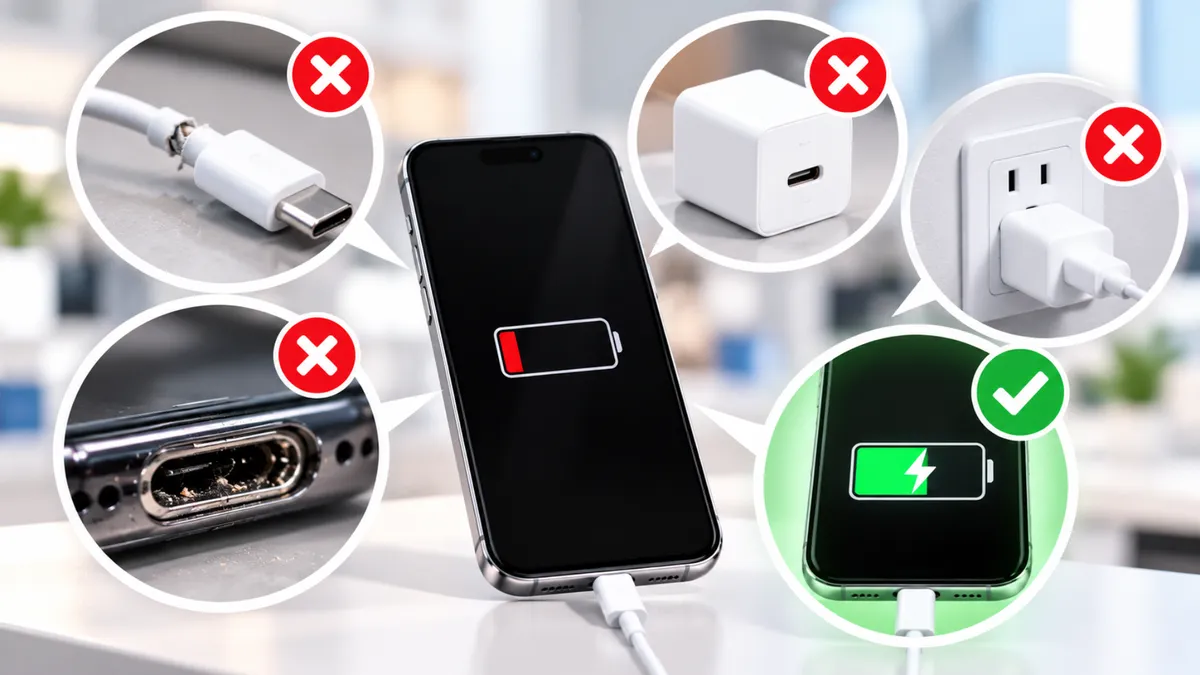
The problem could involve the charging cable, power adapter, charging port, battery, or another internal component.
For wireless dealers, knowing how to respond to these complaints can improve customer service and help customers avoid unnecessary purchases.
The goal is not to turn every employee into a repair technician.
It is to understand the possible causes and guide customers toward the right next step.
Charging Problems Do Not Always Mean the Battery Is Bad
When a phone stops charging, many customers assume the battery needs replacing.
But the battery is only one part of the charging system.
The phone also depends on a working cable, compatible power source, charging connector, and internal charging components.
If any of these parts stop working properly, charging may become slow, inconsistent, or completely unavailable.
For example, a customer may have a perfectly functional phone but a damaged charging cable.
Another customer may have a worn charging port that no longer maintains a reliable connection.
A different device may have an internal hardware problem that requires professional repair.
These situations can look similar from the customer's perspective.
That is why dealers should avoid making a diagnosis before understanding the problem.
Start by Checking the Charging Cable and Adapter
One of the simplest places to begin is with the charging accessories.
Cables can become damaged through repeated bending, pulling, or everyday wear.
Power adapters can also fail.
Before assuming the phone has a serious problem, ask the customer whether they have tried another compatible charger.
If the phone shows no signs of damage, overheating, or liquid exposure, an employee may be able to test it using a known-working, manufacturer-approved or otherwise compatible charging setup.
For example:
A customer says their phone only charges when they move the cable.
Your employee notices that the cable connector is visibly worn.
With a suitable replacement cable, the phone begins charging normally.
In that situation, the customer may not need a new phone or an expensive repair.
They may simply need a reliable replacement cable.
However, if charging remains inconsistent, do not assume the cable was the only problem.
The device may still need professional assessment.
Dirt and Debris Can Affect the Charging Connection
Phones spend a lot of time inside pockets, bags, and other places where dust and debris can collect.
Over time, material may accumulate around the charging connector.
This can interfere with how securely the charging cable connects.
Customers may notice that the cable does not fit properly or that charging works only intermittently.
However, a loose connection does not automatically mean the port is dirty.
The connector may also be worn or physically damaged.
Employees should avoid inserting paper clips, pins, metal tools, or other objects into the charging port.
Even small mistakes can damage delicate contacts.
If debris appears to be present, follow the device manufacturer's guidance or refer the customer to a qualified technician for appropriate cleaning.
A quick, unsafe cleaning attempt is not worth damaging the customer's phone.
When a Phone Charges Only at a Certain Angle
Imagine a customer tells your employee:
“My phone only charges when I hold the cable a certain way.”
That information is useful.
It suggests there may be an intermittent connection somewhere in the charging setup.
Possible causes include a damaged cable, a worn connector, debris, or internal hardware damage.
Your employee should not immediately promise that replacing the cable will solve the problem.
Instead, ask whether the issue happens with different compatible chargers.
If it only happens with one cable, the accessory may be the problem.
If it happens with several chargers, the device may require further inspection.
This simple conversation helps narrow down the possibilities without opening the phone or attempting a risky repair.
Water Damage Changes How You Should Handle the Phone
Charging problems become more concerning when the device has been exposed to liquid.
A customer may explain that their phone stopped charging after getting caught in the rain.
Another may say the phone was dropped into water or had a drink spilled on it.
Moisture can affect charging connectors and internal components.
Some phones can detect liquid in the charging port and display a warning.
Employees should take these warnings seriously.
Do not connect a charger to a wet or potentially damaged port.
Do not insert cleaning tools, use direct heat, or attempt to force the device to charge.
Follow the manufacturer's instructions for liquid exposure.
If the device shows signs of corrosion, damage, or continued charging failure, refer it to a qualified repair professional.
Trying to rush the charging process can create additional problems.
A Phone That Gets Too Hot Needs Special Attention
Heat is another warning sign employees should recognize.
Phones can become warm during normal use and charging.
But excessive heat, swelling, unusual odors, smoke, or other signs of battery damage require a different response.
If a customer brings in a phone showing these symptoms, stop routine troubleshooting.
Do not continue charging the device.
Do not squeeze, open, or attempt to repair a swollen battery.
Follow your store's damaged-battery safety procedure and seek qualified assistance.
If the device is smoking, hissing, venting, or becoming dangerously hot, keep people away and contact emergency services when appropriate.
Customer and employee safety should always come before completing a transaction.
Wireless Charging Can Help Narrow Down the Problem
Some smartphones support wireless charging.
If a compatible phone charges wirelessly but does not charge through its cable, that information may help a technician investigate the issue.
It could suggest a problem involving the wired charging connection or its associated components.
However, it does not prove that the charging port is defective.
Different charging methods may involve different hardware and software conditions.
Employees should also avoid using wireless charging as a test when the device shows signs of battery damage, swelling, excessive heat, or other safety concerns.
For ordinary charging complaints, understanding which charging methods work can provide useful information for a professional diagnosis.
What to Ask Before Recommending a Repair
When a customer says their phone will not charge, a few questions can help your employee understand the situation.
1. When did the charging problem begin?
A sudden failure may have different possible causes from a problem that has gradually become worse.
2. Have you tried another compatible cable or adapter?
This helps determine whether the problem may involve an accessory.
3. Does the phone charge sometimes or not at all?
Intermittent charging may suggest a connection problem, although further diagnosis may be necessary.
4. Has the phone been dropped or exposed to water?
Physical damage and moisture can affect charging components.
5. Does the phone become unusually hot?
Excessive heat can indicate a problem requiring immediate attention.
6. Have you noticed any swelling or changes to the phone's shape?
Visible distortion may indicate battery damage and should be treated as a safety concern.
These questions do not replace technical diagnostics.
They help employees recognize whether the situation is suitable for basic assistance or requires professional repair.
Know When to Refer the Customer to a Technician
Not every wireless store offers repair services.
And even stores that perform repairs may not be equipped for every charging problem.
Some issues involve internal connectors, charging circuits, or other components that require specialized equipment.
Attempting these repairs without proper training can cause additional damage.
If the problem cannot be explained through safe external checks, recommend a qualified repair provider.
A technician can inspect the device and determine whether cleaning, component replacement, or more advanced work is appropriate.
Dealers should avoid quoting a guaranteed repair cost or outcome without a proper assessment.
It is better to give the customer accurate expectations than to promise a quick fix that may not be possible.
A Charging Problem Can Become a Customer Service Opportunity
Imagine a customer visits your store expecting to purchase a new phone.
They believe their current device has stopped working.
Your employee asks a few questions and helps them determine that their charging cable is damaged.
The customer purchases a suitable replacement cable and can continue using their phone.
That may be a smaller transaction than a device sale.
But it also shows the customer that your store is willing to help them find an appropriate solution.
In another situation, a technician may determine that the phone needs a repair.
If the repair is not practical or the customer prefers a replacement, your store may be able to explain suitable device options.
The important thing is recommending products based on the customer's actual needs.
Helpful service can support customer trust, repeat visits, and future wireless opportunities.
When Repair Costs More Than the Phone Is Worth
Sometimes a charging problem is more complicated than a damaged cable.
An older phone may need extensive repairs.
The customer may also be dealing with a weak battery, broken screen, or other existing issues.
In these situations, replacing the device may be worth considering.
But dealers should not make that decision for the customer.
Explain the available options.
For example, an employee could say:
“If the technician confirms that the repair is expensive, we can also look at replacement phones within your budget. That way, you can compare the options before deciding.”
If the customer chooses a replacement, help them understand device compatibility, activation requirements, and number-transfer options.
Do not attempt to charge or power on a damaged phone simply to transfer data.
A qualified professional may be needed to assess safe data recovery options.
Compatible Charging Accessories Can Create Additional Sales
Charging problems can also reveal a legitimate need for replacement accessories.
Customers may need a new charging cable, wall adapter, car charger, or other compatible product.
But employees should recommend accessories carefully.
Before selling a charger, check the device's charging connector and supported charging requirements.
For example, a customer with a USB-C phone may need a compatible USB-C cable and suitable power adapter.
Not every charger provides the same charging performance.
A customer using an older or lower-powered adapter may experience slower charging even when the equipment is working correctly.
Explain the differences without promising unsupported charging speeds.
The goal is to help customers choose accessories that work safely with their devices.
Train Your Team to Handle Charging Complaints Better
Wireless dealers can improve customer service by teaching employees a simple approach to charging complaints.
1. Ask about the problem before recommending a product.
Understand what the customer is experiencing.
2. Check for safety concerns first.
Watch for swelling, excessive heat, liquid exposure, or other signs of damage.
3. Understand charging accessory compatibility.
Employees should know which cables and adapters work with the devices they sell.
4. Avoid unsafe cleaning or repair attempts.
Do not allow untrained employees to insert tools into charging ports or open damaged devices.
5. Know when professional repair is needed.
Identify qualified repair resources for problems beyond your store's capabilities.
6. Explain replacement options when appropriate.
If a repair is not practical, help customers compare suitable devices and service options.
These habits can help employees respond more confidently without making promises they cannot support.
Help Customers Before Assuming They Need a New Phone
A phone that will not charge can be frustrating for customers.
They may worry about losing their contacts, photos, messages, and access to important accounts.
But a charging problem does not automatically mean the phone needs replacing.
The issue may involve an accessory, the charging connector, the battery, or another component.
Wireless dealers can help by asking useful questions, recognizing warning signs, and guiding customers toward the right solution.
Sometimes that means recommending a compatible cable.
Sometimes it means referring the customer to a qualified technician.
And sometimes replacing the device may be the most practical option.
The important thing is helping customers understand their choices before making a decision.
Support Your Wireless Business With UPD
Independent wireless dealers serve customers with many different device and service needs.
At Unlimited Prepay Distribution (UPD), we're focused on helping dealers explore available wireless products, understand service opportunities, and strengthen their businesses.
Whether customers need a compatible replacement device, a new activation, or guidance on available wireless options, being prepared can make a difference.
Want to explore more opportunities for your wireless store? Connect with Unlimited Prepay Distribution and learn how UPD can support your dealer business.


